RUX Service Gets a Major Upgrade with More Powerful Field Service Management, Now in the Hands of Your Technicians

Field service does not happen at a desk. It happens in the yard, on the road, and at a job site hours away. Yet too many service businesses still run the field on paper forms, phone calls, and software built for a desktop screen.
RUX Software has launched the completely rebuilt RUX Service, designed for a mobile-first experience on iOS and Android. It is engineered from the ground up inside Microsoft Dynamics 365 Business Central, and it comes with a companion mobile app that puts the technician's whole workday in the palm of their hand. Read the full press release here.
The result is one connected operation, from the first customer call to the final invoice.
One connected system for your entire service operation.
Service businesses run on a lot of moving parts. Dispatchers coordinate schedules. Technicians need accurate job details. Purchasing needs to know which parts are required. Accounting needs complete records to bill the work.
RUX Service brings all of it together inside Business Central. Service quotes and orders, customer sites, installed equipment, technician assignments, planned maintenance, warranty, returns, SLAs, procurement, and invoicing all live in one connected system.
We rebuilt RUX Service around the task, because that is how service work actually happens. Managers see exactly what needs to be done, who owns it, and where each job stands. Every task connects directly to Business Central inventory, purchasing, and accounting. That means no re-keying, no disconnected records, and a straight line from completed work to revenue.
Dispatchers plan the day. Technicians own it.
The right technician, at the right job, at the right time. That is the heart of an efficient service operation.
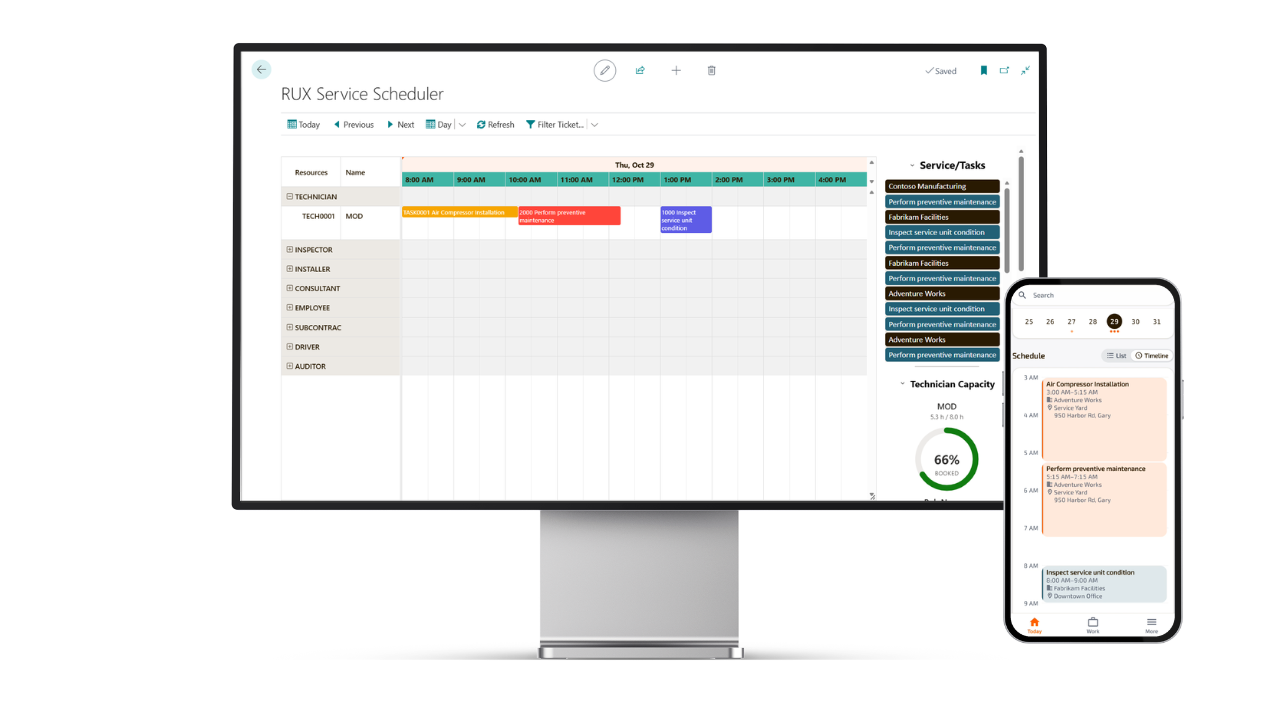
The RUX Service Scheduler gives dispatchers a visual, drag-and-drop board to assign work and balance technician capacity. Unassigned tasks and scheduling conflicts are easy to spot, and appointments move in seconds when priorities change. Saved filters, event templates, and touch-friendly controls make planning just as fast on a tablet as on a desktop.
Planned maintenance runs on its own. Build plans on a recurring schedule or on equipment meter readings, and RUX Service generates the service work automatically when it is due. You stay ahead of equipment issues and build a predictable pipeline of recurring revenue.
Give technicians the information and tools they need.
The biggest leap in the rebuilt RUX Service is its mobile-first design.
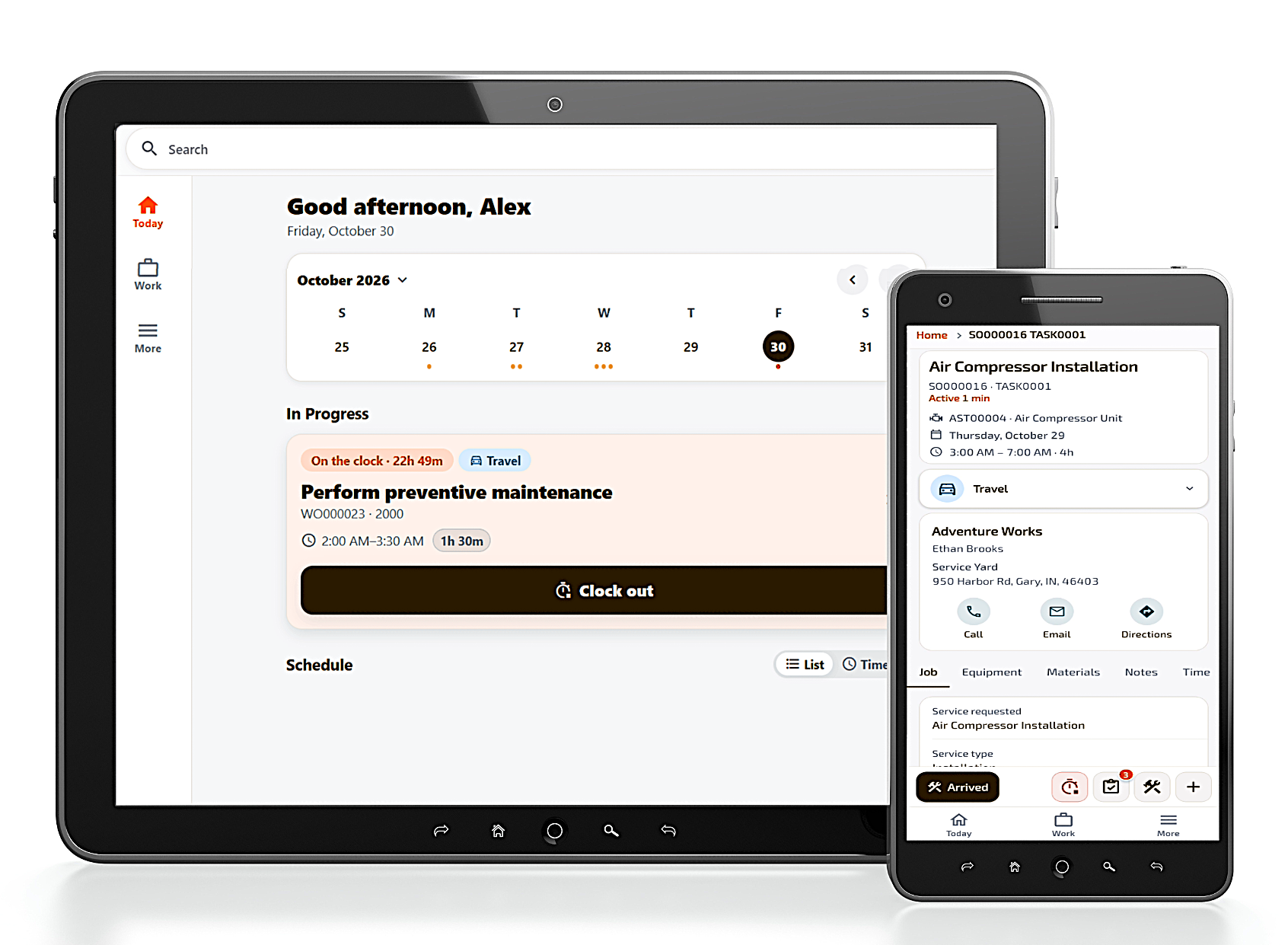
The companion app for iOS and Android opens on the technician's day: the schedule, every assigned task, and every job detail in one place. No calling the office. No digging through emails. From the job site, technicians can:
- See customer, site, contact, equipment, and serial number details
- Get turn-by-turn directions with one tap
- Update task status as the work moves forward
- Clock in and out against each task
- Record parts and labor as they are used
- Complete digital checklists and inspections
- Add notes, take photos, and capture customer signatures
Work gets documented while it happens, not pieced together from memory at the end of the day.
And when the signal drops, the work keeps going. The app saves everything securely on the device and syncs automatically when a connection returns. Remote construction sites, industrial plants, rural locations, basements: if your technicians can get there, the app works there.
“Building for iOS and Android was not a choice. It was essential,” said Natalie Lemke, CEO of RUX. “The market has been clear. Technicians want mobile tools that are simple to learn and quick to use, and service leaders want that data in their ERP the moment the work is done.”
More complete service records. Faster billing.
What gets captured in the field shows up on the bottom line.
Digital checklists standardize every inspection and procedure. Photos and customer signatures provide proof of completed work. Time tracking captures both travel and on-site labor, and parts recorded at the point of use make it onto the invoice instead of slipping through the cracks.
Back in Business Central, those details flow straight into structured pricing, service ledger entries, and invoicing. Jobs close faster. Invoices go out sooner. And managers get the full picture with warranty coverage, SLA tracking, returns, and complete service history at their fingertips.
Better data means better decisions, stronger customer relationships, and healthier margins.
Built for the way service teams work today.
The rebuilt RUX Service is available now on Microsoft AppSource for Microsoft Dynamics 365 Business Central. Its companion mobile app is available on the Apple App Store and Google Play.
The office and the field, finally running as one. Technicians get tools they want to use. Managers get the visibility and control they need. And the business gets service that runs like clockwork, not patchwork.
Ready to put your service operation in motion? Contact the RUX team or your Business Central partner to schedule a personalized demo today!



Ready to take control of your operations?
RUX engineered oil and gas field service software to fit your operation—no patches, no guesswork. Business Applications built and configured for the oilfield service industry, our software solutions give you clarity and control to move forward with confidence.