Streamline Rental Invoicing, Dispatch, and Field Service Work: Introducing RUX Rentals and RUX Service 16.0

If you manage an equipment rental business and/or field services with Dynamics 365 Business Central you will appreciate the new operational enhancements in RUX Rentals and RUX Service 16.0. This release focuses on faster warehouse flows, smarter dispatch exchanges, cleaner invoicing, better calendar and overtime handling, plus helpful image and attribution tools. Below is a summary guide to some of the latest features you can start using right away.
What’s New for RUX Rentals
RUX Rentals 16.0 has added several productivity features aimed at reducing manual entry and improving logistics.
Continuous rental unit scanning
You can scan rental unit barcodes directly from a contract line using the new Scan Rental Unit action. A warehouse worker with a handheld scanner can quickly populate lines without typing, which reduces errors and speeds up picking and shipping.
More capability to resolve shortages with Substitutes function
If a contract requires units that are short at one location, you can now resolve shortages by selecting substitutes. Substitutes can come from alternate locations and from defined groups, and the system will prompt which price set to use when groups overlap. To use substitutes:
- Open the shortage resolution for the contract line
- Choose Substitute and pick the rental unit number from the lookup
- Confirm whether to use the existing line pricing or the substitute pricing.
Note: Be sure to define substitute relationships on the Rental Unit card under Related >Substitutions so the system knows which groups are interchangeable.
Enhanced inventory transfer function allows easy data transfer to existing contract
Transfers can now target an existing contract. When you pick a different customer the Copy Header option will disable automatically. The transfer action sets the original line Off Rent and places the unit On Rent on the receiving contract for the new customer. This makes reassigning equipment between ongoing contracts simpler.
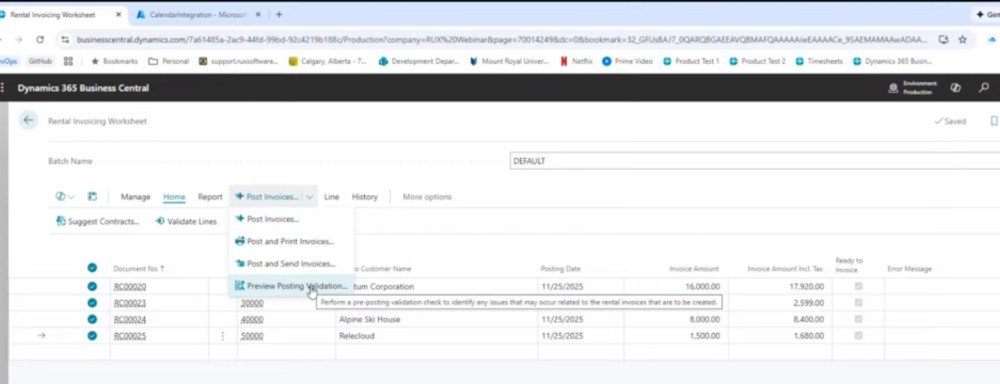
Rental invoicing worksheet preview posting validation
The invoicing worksheet now includes a Preview Posting Validation action. It runs the same checks the invoice posting process performs but without stopping the entire run. Lines that pass will be posted and lines with errors will be marked Not Ready to Invoice with an error message explaining why. This prevents a single configuration issue from blocking the whole batch.
Rentals exchange integrated with dispatch
When dispatch is enabled, you can handle an exchange on rent with full pickup and delivery planning. Key points:
- A Dispatch Delivery Return flag controls whether the exchange triggers actual pickup and delivery loads or just a paper transaction
- Processing an exchange will schedule a pickup for the returned unit and a delivery for the replacement unit in the planning worksheet
- Create loads, assign drivers and vehicles, then post shipments to complete the logistics.
This keeps logistics inside the dispatch module rather than requiring manual single transactions.
Find as you type and look up options
The rental unit lookup supports find as you type for faster searching while retaining the full lookup page if you prefer browsing. This resolves a common pain point when looking up unit numbers.
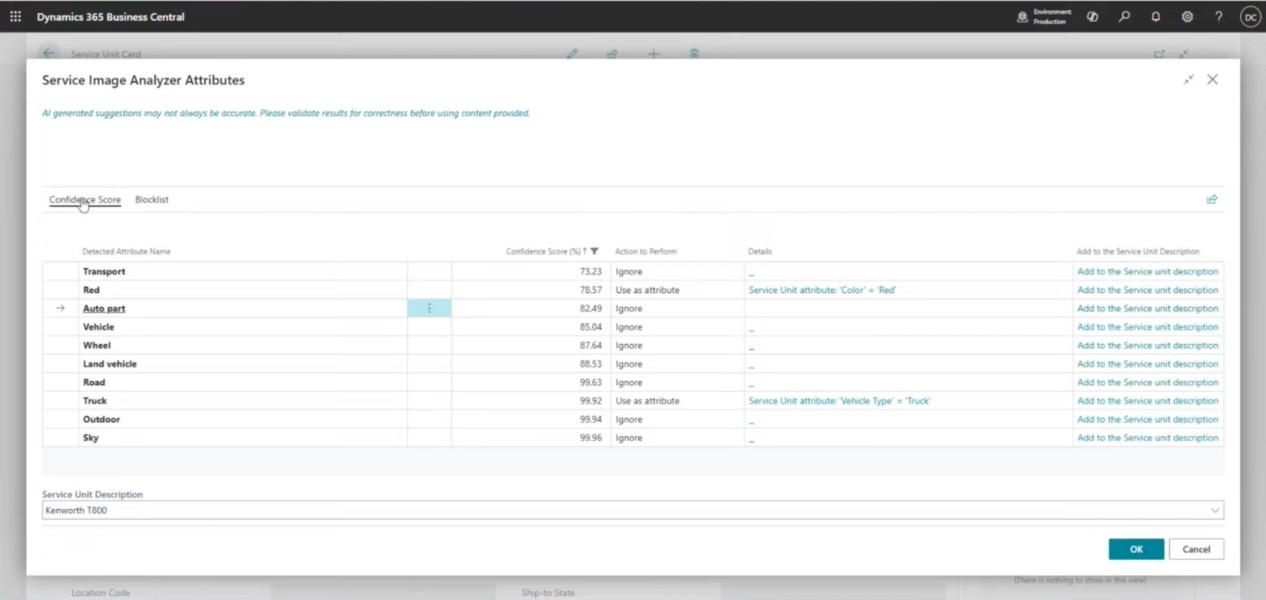
New Image Analysis function for units and assets
Upload a photo of a rental unit and the Image Analysis feature suggests attributes like vehicle type and color. The system will also suggest categories where applicable so you can tag units faster and keep your master data consistent.
What’s New for RUX Service
RUX Service 16.0 improves how you assign work, calculate overtime, and manage asset attributes.
Calendar integration for task assignments
Technician tasks you add to your Visual Resource Scheduler can now sync to Outlook calendars. When a task is assigned and the technician calendar connector is configured via Azure, events will also appear in technicians’ calendars:
- Tasks update resource capacity visually as they are scheduled
- Events show up in Outlook and can be set to auto accept when users are in the same domain
- Please note that Azure app registration and the authorization URL from Azure are required to enable the connector.
This makes it easier for technicians to see assignments and reduces missed or double-booked work.
Auto overtime calculation for resources
Overtime can now be calculated automatically for service resources based on configured resource capacities and calendars. Setup overview:
- Define standard capacity templates, for example an eight-hour day, Monday to Friday
- Mark non-working days such as Saturday and Sunday on the company calendar
- Map overtime work type codes in Service Management Setup using Project Planning Line Default Overtime Work Type.
When you enter time on a ticket that exceeds capacity or falls on a non-working day the system splits regular and overtime work and applies the correct work type and rate automatically. For example, a nine-hour booking will show eight hours at the normal rate and one hour at the overtime rate.
Visual Resource Scheduler color configuration
Colors on the Visual Resource Scheduler are now configurable, which helps you to visually distinguish job types, priorities, or resource groups the same way you may already color code rental calendar views.
Image analysis for units and assets
Upload a photo of a service unit and the Image Analysis feature suggests attributes like vehicle type and color. The system will also suggest categories where applicable so you can tag units faster and keep your master data consistent.
Service unit attribute setup and query
You can configure which attributes appear on the service unit list using positional attribute fields. For example, you might expose Vehicle Type as Attribute 1 and Color as Attribute 2. These fields become filterable on the service unit list so you can quickly find the equipment you need.
Practical configuration tips
- Substitutions: Set substitution relationships on rental unit cards under Related > Substitutions before relying on the Resolve Shortages flow.
- Dispatch and exchanges: Toggle Dispatch Delivery Return for exchanges depending on whether you need full pickup and delivery planning or a simple transaction.
- Overtime: Create realistic resource capacity templates and set non-working days on the company calendar so overtime calculations reflect your rules.
- Calendar connector: Register an Azure app and configure the authorization URL in your Service Manager Setup to enable automatic calendar invitations and tentative acceptance.
- Invoicing validation: Run Preview Posting Validation on the rental invoicing worksheet before posting to avoid stopping batch processing for a single configuration error.
- Image analysis: Use photos to speed attribute assignment and keep item and unit records consistent across rentals and service.
Bonus Tip: Add the Free RUX Health Check App!
If you use RUX Rentals and/or RUX Service as part of your Business Central system, you’re eligible for our free RUX Health Check app. This solution helps you catch any system issues within setup, accounting, and inventory before they become operational problems. Learn more details about this free offer.
Final notes
RUX Rentals and RUX Service version 16.0 delivers practical improvements that fit with your existing Business Central workflows, reduce manual effort, and improve accuracy across your rentals, dispatch, and service activities. We’ve designed this update to really focus on the small configuration items that unlock the biggest wins for your day-to-day business to see faster turnaround for deliveries and exchanges, cleaner invoicing runs, and more predictable overtime calculations.
Check out the full video to see a demo of version 16.0. Explore the new features and let us know if you have any questions about them.




Ready to take control of your operations?
RUX engineered oil and gas field service software to fit your operation—no patches, no guesswork. Business Applications built and configured for the oilfield service industry, our software solutions give you clarity and control to move forward with confidence.