Convergence Conference Notes: How to set yourself up for AI success

By Natalie Lemke - CEO, RUX Software
I just got back from the Convergence Conference in Miami, and I’m still buzzing from all the conversations and insights shared there. As this year’s Microsoft conference season wraps up, one theme keeps coming up across every conversation with partners and customers: data quality.
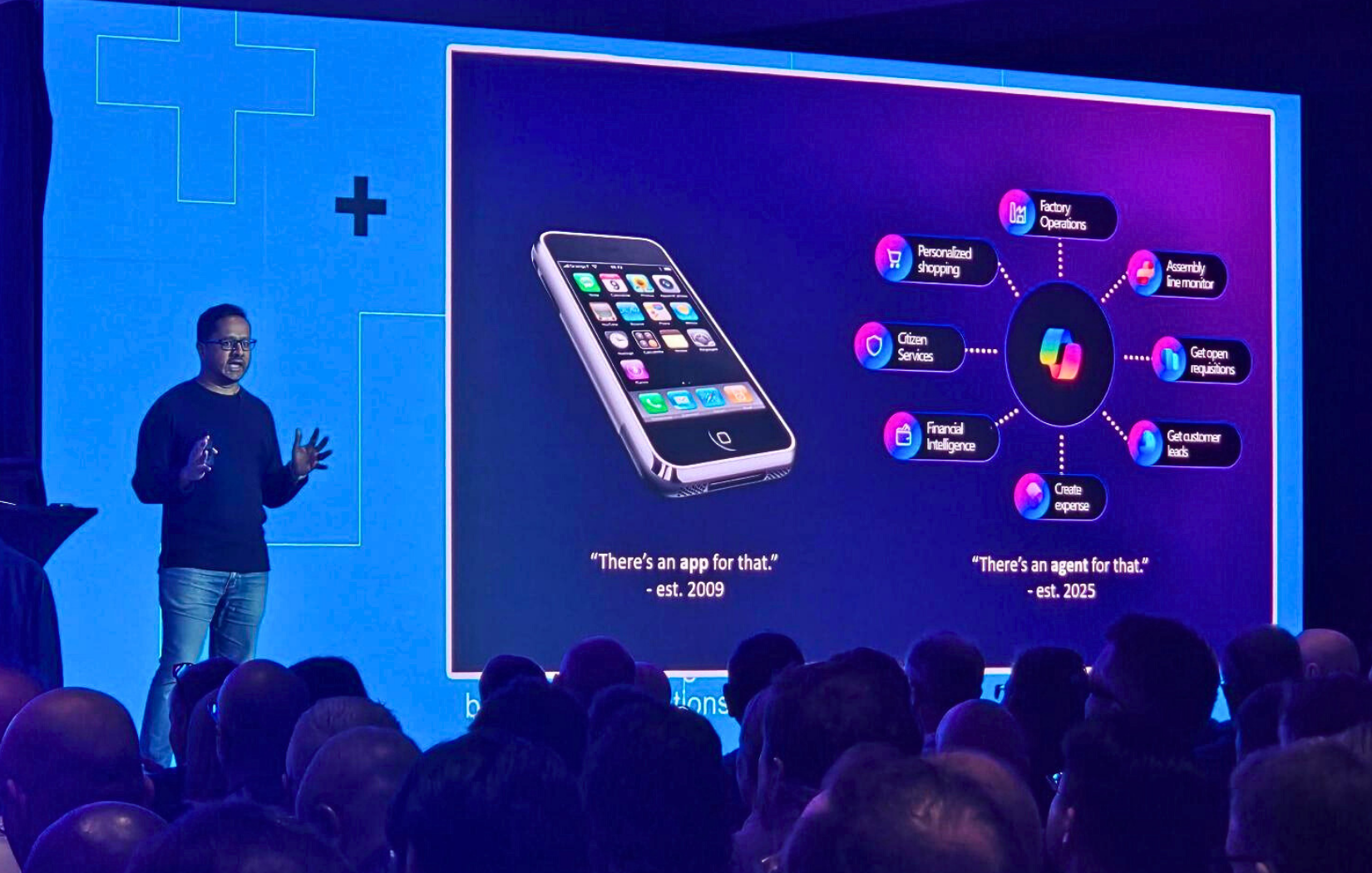
At Convergence, Microsoft showcased how rapidly AI is being woven into the ecosystem. We’ve moved from “there’s an app for that” in 2009 to today’s “there’s an agent for that.” Microsoft has built over 500,000 connection points across Dynamics apps for Copilot, creating the foundation where AI can drive productivity and actually help teams get work done.
But here’s the thing I’ve been emphasizing and will continue to emphasize; AI is only as good as the data you feed it. Your business operates in the physical world, but AI works with your digital representation of that world. If those two don’t match - if your system says you have 10 units in inventory, but you actually have 7, or if your asset location data is outdated, then all those fancy AI capabilities will just amplify the problem instead of solving it. Data cleanliness is the foundation that makes AI actually useful.
One of the best uses in any business application and uses of your organization’s time is to ensure that your system of record is being supported by processes that feed good quality data into it - whether that's a structured database, a relational database, or a Ledger entry-based database. If agents aren’t set up with good quality data, the outcomes and the insights that you're going to receive back are going to be shaky and you’re not going to get the maximum value out of your solution.
6 practical tips to make sure your business data is clean before you start using AI.
1. Start with a test environment or sandbox. As an organization, you may have set up business processes you work with for validation and documentation. Leveraging a sandbox and thorough testing confirms that what you expect to happen will happen.
2. Store old and obsolete data. If you have data laying around that is 20 years old from a season of your business that has no relation to the current organization, focus, or goals, that data is still going to be considered by your AI tool. Consider putting outdated data in storage or purging data based on your records retention policy.
3. Ask your front-line employees if they trust the current system data. When they are renting an asset to a client, do they go to the yard to see if it’s available or do they look at your system and scheduler? Is your data correct, well-maintained, and a reflection of fact? Asking these types of questions to your team typically will give you solid visibility into how reliable your data is.
4. Listen to your employees’ end-user feedback. Your staff can tell you when unhelpful data is being created because of the way your system is set up. There may be faster shortcuts being taken that are not desirable, but yield the quick results needed to get a task complete. Hands-on feedback from your staff can help you identify inefficiencies and the sticky points in your system and digital business processes they need to get around each day.
5. Avoid any opportunities for human error. When source data can be scanned straight into a piece of equipment, the quality of that data is higher with less risk for human error. For example, use RFID tags that provide insight into asset locations or a telematics device to store and share GPS locations, instead of having a person provide that information. This way, you’re removing that extra data entry step that relies on a human being manually typing information into a device.
6. Work with your software partner to find the right integration or process optimization to remove friction for your end-users. When your set up is optimized, you know the quality of your data will improve, day-to-day business will be streamlined, and your staff will not feel the need to cut corners to speed up processing customers or maintaining records.

Proper prompting is powerful.
Another big message shared at industry events this year was that we all need to know how to adequately prompt AI tools and ask for what we need. You may have heard people call some content and data produced by AI “slop” – overgeneralized information with too many buzzwords and not enough substance. But I find that AI responses are only slop if you have been sloppy in your prompting and asked the wrong thing. A well-structured question or prompt that is specific, detailed and meaningful will return good results.
You also may have heard the expression, “Garbage in - garbage out.” If the instructions and conditions within your prompt for AI aren't appropriately inclusive (or exclusive), you might not be getting what you bargained for.
We need to be just as specific when we have a request for a friend or colleague. For anyone who's ever fought with Microsoft Excel, you know you must use specific formulas and set detailed parameters to get the results you need. It takes some thought and a little planning. AI tools aren’t very different.
It’s also important to remember that AI tools are structured to be agreeable and provide affirmative responses, i.e. it will do its best to give you data you ask for, even if that data is one-sided or half true and your request was very neutral in tone. I'm not recommending you be suspicious of every response, but I do encourage you to be critical of the information AI feeds you. Ask yourself, “Is this answer actually what I need or is it a biased, overgeneralized response because of how my question was structured?”
Read this article on the top 7 prompts you need to know to master Copilot!
Bonus AI prompt tip!
One of my favorite prompts from Microsoft Ignite that anybody can use with Copilot to improve how efficient they are at work is: “What pieces of information should I have top of mind prior to heading into a meeting with” and fill in the person's name. The results have been helpful in my experience. AI will search Teams, our E-mail correspondence, and our recently recorded meetings to suggest open action items and discussion topics.
Please contact us if you would like to discuss how to get the most out of AI+ERP tools for your business!




Ready to take control of your operations?
RUX engineered oil and gas field service software to fit your operation—no patches, no guesswork. Business Applications built and configured for the oilfield service industry, our software solutions give you clarity and control to move forward with confidence.